TABLE OF CONTENTS
- What is this security upgrade?
- Why is Power Factors doing this migration?
- When will the migration be completed?
- How do I login after upgrading my account?
- How do I reset MFA?
- Is the Unity mobile application impacted?
- How do I request access to more sites?
- How do I get support for my login issue?
- How do I escalate my issue?
- Will APIs or other services be impacted?
- What happens to shared accounts?
What is this security upgrade?
This security upgrade modernizes how users sign in to Power Factors Unity SCADA. Once the upgrade is rolled out to your account, three things change:
- Stronger passwords - All users will be required to set a new password that meets enhanced complexity and rotation standards, replacing the legacy password rules used previously.
- Multi-factor authentication (MFA) - Each sign-in will be verified with a second factor, typically a code from an authenticator app on your mobile device (such as Google Authenticator or similar) or a hardware security key, in addition to your password.
- One identity per user - Each person will have a single, unique login tied to their email address, used consistently across Power Factors products, support portal, and community. Shared or duplicate accounts will no longer be supported.
When your user has been enabled for migration, you will be prompted at your next login to complete a brief in-app activation flow to confirm your email, set a new password, and register your MFA method. The whole process takes only a few minutes. To complete it, you'll need access to your email inbox and a mobile device with an authenticator app or security key.
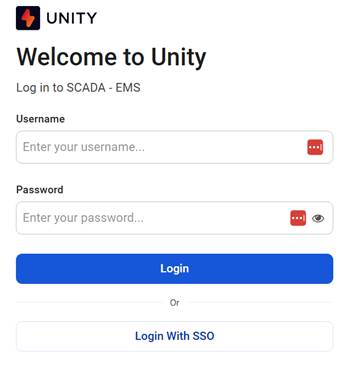
After activation, your day-to-day login experience stays familiar: enter your email, your new password, and approve the MFA prompt. Once you’ve completed the upgrade, you will be using the “Login with SSO” button to login with the new authentication.
Why is Power Factors doing this migration?
We're making this change to bring Unity SCADA in line with current security best practices and the expectations our customers, partners, and auditors have of any modern SaaS platform. Specifically, this upgrade is for:
- Protecting customer accounts and data - Passwords alone are no longer sufficient to defend against today's credential-based attacks. Requiring stronger passwords plus MFA dramatically reduces the risk of account compromise. Even if a password is leaked or guessed, an attacker still cannot get in without the user's second factor.
- Meeting security and compliance requirements - Enhanced password policies, MFA, and a single verified identity per user are now standard requirements across the SaaS industry and within our own security program. This upgrade closes those gaps for all Unity users.
- One login, one identity across Power Factors - Today, users may have separate credentials for different Power Factors tools. Moving every user to a single, verified login means one account, one password, and one MFA setup that can be used everywhere, including the new PF support portal and community.
- A consistent, predictable sign-in experience - This is the same kind of security update users are already familiar with from their bank, email provider, or other business systems. It is a routine, expected modernization of how access is granted and identity is authenticated.
Because this is a security and compliance requirement, it applies to all users. There is no opt-out, and the activation step must be completed in order to retain access to Unity SCADA.
When will the migration be completed?
All customers will be fully migrated to the enhanced security requirements by April 28, 2026. Logging in after this date with a legacy username and password will begin the upgrade workflow. Once you’ve completed the upgrade, you will be using the “Login with SSO” button to login with the new authentication.
How do I login after upgrading my account?
Once you have completed your upgrade, you will always sign in using the Login with SSO button at the bottom of the login page. Once all users have been upgraded, we will be removing the username and password login area completely:
How do I reset MFA?
If you would like to switch MFA to a different device or authentication type, please send an email to Login Support <loginsupport@powerfactors.com>. Our team will respond to you in 1-2 working days.
Is the Unity mobile application impacted?
Yes, login access to both the Apple and Google Unity mobile applications will only support the new authentication going forward.
To log in to the mobile application:
- Login to your Unity portal on desktop and complete the steps outlined above to setup your new password and MFA authentication
- Download the latest version of the Unity mobile application from the respective app store on your phone
- Add in your service portal login information at the top of the application
- Click the “Login with SSO” button on the new mobile interface
Note: The security upgrade process cannot be completed in the app itself, you must complete step 1 from a desktop browser.
How do I request access to more sites?
Our Technical Support team will be best placed to help you get access to more sites. To ensure your request is handled securely and in line with our compliance requirements, we kindly ask that you submit a ticket directly through our support portal — this ensures it reaches the right team with all the proper protocols in place. Our support team will be ready to assist you as soon as your ticket comes in! Click here to access the support portal.
How do I get support for my login issue?
For Issues related to user migration or login process, please send an email to Login Support loginsupport@powerfactors.com. Our team will respond to you in 1-2 working days.
How do I escalate my issue?
For urgent requests and escalations, please send an email to loginsupport@powerfactors.com.
Will APIs or other services be impacted?
API is not impacted. It is important to note that any existing machine to machine or automation scripts are not supported with user account credentials, please instead use the supported APIs with API Keys.
What happens to shared accounts?
Shared accounts are not supported anymore, each user should be associated with a unique email address and MFA.
Was this article helpful?
That’s Great!
Thank you for your feedback
Sorry! We couldn't be helpful
Thank you for your feedback
Feedback sent
We appreciate your effort and will try to fix the article